

SWC Forums
Pull up a chair...let's talk fishing.

Dave
I keep having problems with the items not finishing downloading. I always have either 44, 38, or 31 items remaining to down load and it will sit like this for 8 min. I wasn't having a problem the other day.
IE 7.0.5730.11
Also I could not get to the map from the sc site. I keep getting the click button to proceed screen. I was logged in and am allowing popups.
Also can you give me a call about hosting my website. I am ready to go ahead and switch. Thanks. Stephen

Chaos,
We got ya fixed up. Welcome Aboard!
Dave
OK Guys....I have a List of wants...
Always Display Depth.
What I am thinking here is a check box in Details if you want Depth always displayed. If you select the box...It is always on. If you do not checke the box....it will only show when you have the bottom color chart showing.
Display....Top to botom in this order...
Other....(Clor/NWS Forecast Region/Current Speed)
SST Temp
Depth
Lat
Long
Hows that?
We are going to turn off the +4 Zoom on wavecast. Before we had it Auto Zooming to +4 when you selected Wavecast so the image would be clear....
We are going to turn OFF Auto Close when you select Reefcast.
We are going to "Try" to make the Measure tool turn off when you select something else.
We can not move the blue box.
We talked about recentering the map on every click so the box you open will never be off the side of the map. I think it is a bad idea and I will tell you why. Think about this. We can not do this selectivly. We either autocenter or not autocenter. So more or less everytime you get the map just so....and then you select something to view....the map would shift and you would have to redownload the entire screen again.
Anyone with anymore suggestions?
Dave
I got the Blue Box moved to the far left bottom and we moved all the ST thimbs into the right hand window....so everthing SHOULD be out pf the way.
In IE...I still have a LITTLE overlap...but It will get fixed later today.
Guys...Go LOOK NOW! IF there are changes you want made...now is the time to do it. If you ask me for it later....I will tell you it will have to wait till the next round of changes.
Dave

I looked and i like it !!! I still can't get a Waypoint to stay in or the plot to stay in but I'm pretty sure that's all me ! 😳 Double checking some of my logs against the #s and depths looks good !! No worry I'll wait for the Manual or the Movie LOL.
Thanks again capt.
Don
Oldmud,
Good catch....TYhat has now been fixed. We also added "Right Click" drop waypoint. So where youa re looking at something...say a temp break. You can right click down the break and drop waypoints. There name will be Dat-Time in the User waypoint list.
We also added to Loops for ALL SST and Clor shots. So you can view an animation of the last X number of shots. You can turn on or turn off this shot or that shot (like if it is missing data for that day) you can also zoom in.
100% BadAss!
Dave
What do ya'll think of being able to see through the SST shots so the other layer show through? Do you like it? Don't like it?
Dave
Oh....and I might add.....Everything Updates every 6 hours....except for stuff like the forecast buoys...They update every hour.
Dave

Dave, I like having the SST shots in the background...allows you to reference waypoints vs. SST, which is a good thing. Layers like this should always been set so the draw order is forced to back.
A few notes:
-The distance measurement reading is now over the blue box and hard to find. Need to move it above the blue info box.
Also, is there any way we can get an info popup about our personal waypoints?
distance measurement reading is now over the blue box
It should be inside the box....Is it outside?
What size monitor are you sueing?
Can you take a screen shot for me so I can see what it looks like....
Dave
Slackerb,
I think I have got all that straightened out.
GUYS>>>>>>>>>>>>>>>>>
WE are about to WRAP this project up. Everyone PLEASE go Bang on it ONE more time.....
http://www.fryingpantower.com/modules.php?name=Bluewater_Supermap
IF there is anything else you want....or you think does not work excatly the way you want....NOW IT THE TIME!
Dave

I still can't get it work right on IE.
The measure tool doesn't show up and the maps won't finish loading.
It worked for me at home on the version of IE with the tabs but not my older version at work.
Here is where it gets stuck trying to load the 3-day composite SST, pretty much does this on any detail map I try to add.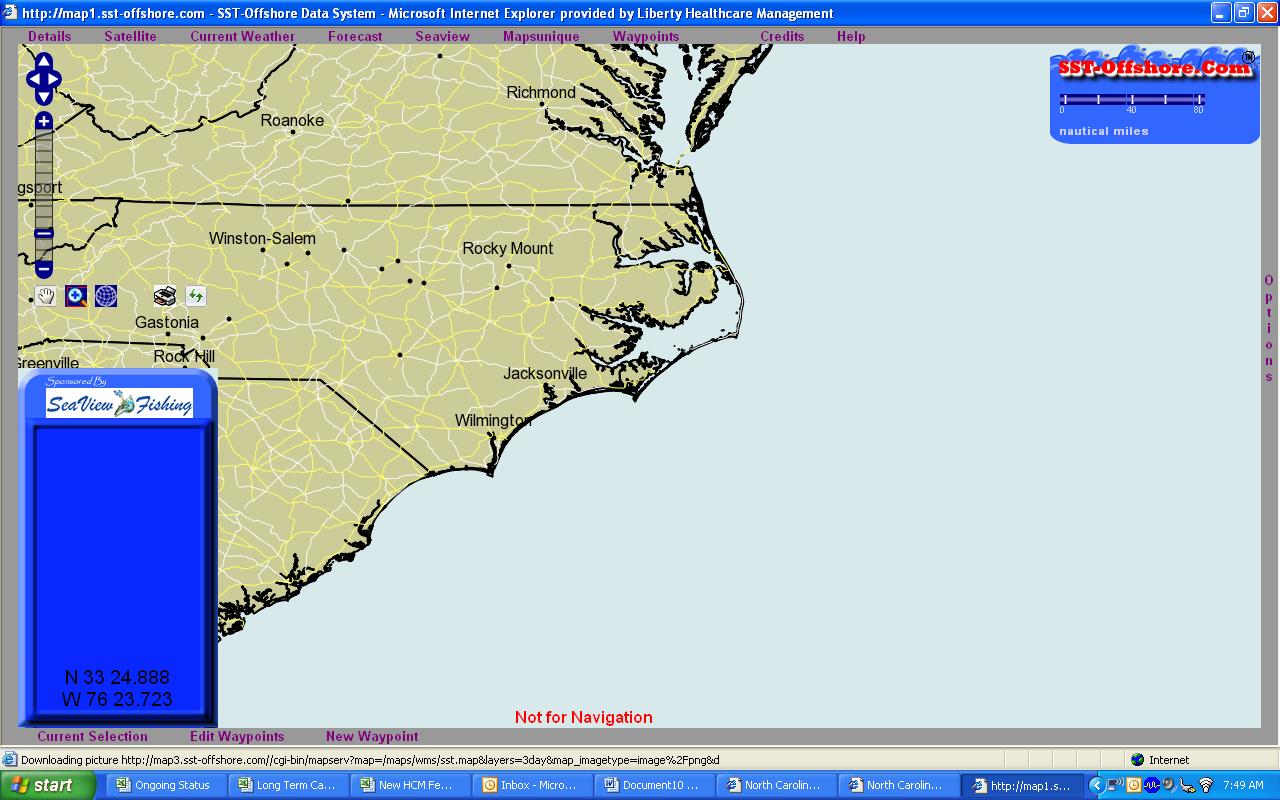
hrdcor32,
Are you on IE6.0?
There have been several issues with 6.0. IF you would give me a call at 910-458-3145 and I would like to walk you in and talk about what is happening.
Based on some of the Tech that we are using to push this map....There may not be a resolution for those problems other than upgrading to a newer version of the browser BUT I want to make sure there is not some other problem.
It is KNOWN to work on IE 7.0 and FF Current.
Dave
Do you have Javascript turned on?
What are the security permissions you have set?
Do you have any "Popup" blockers turned on?
Dave